



Streamlined content management means replacing scattered drafts, unclear ownership, and last-minute publishing with a connected system for planning, creating, approving, distributing, and improving content. The right stack does not need to be huge; it needs to match your content strategy, team size, channels, and approval process. This guide explains the main categories of content tools, where leading platforms fit, and how to choose a workflow that makes content creation easier to repeat.
Table of Contents
What does streamlined content management really mean?
Streamlined content management is the practice of moving every piece of content through a clear, visible, and repeatable process, from idea to measurement. It includes content planning, production, asset management, publishing, content distribution, and content optimization, so teams know what is being created, who owns it, where it will appear, and how performance will be reviewed.
A streamlined system is not just a calendar. It is the operating model behind the calendar. A blog post, product page, email, video, and social campaign may all require different formats, but they still need shared briefs, deadlines, approvals, brand assets, metadata, distribution plans, and performance feedback.
The best content management setup usually combines several types of tools:
- A planning hub for ideas, campaigns, deadlines, and responsibilities.
- A workflow tool for tasks, approvals, dependencies, and handoffs.
- A CMS or content platform for publishing web content.
- Creation tools for copy, design, video, and brand assets.
- Distribution tools for email, social, syndication, and campaign scheduling.
- Optimization tools for SEO, readability, analytics, and conversion improvements.
- Specialized systems for product content management, video content management, or digital asset management when content volume becomes complex.
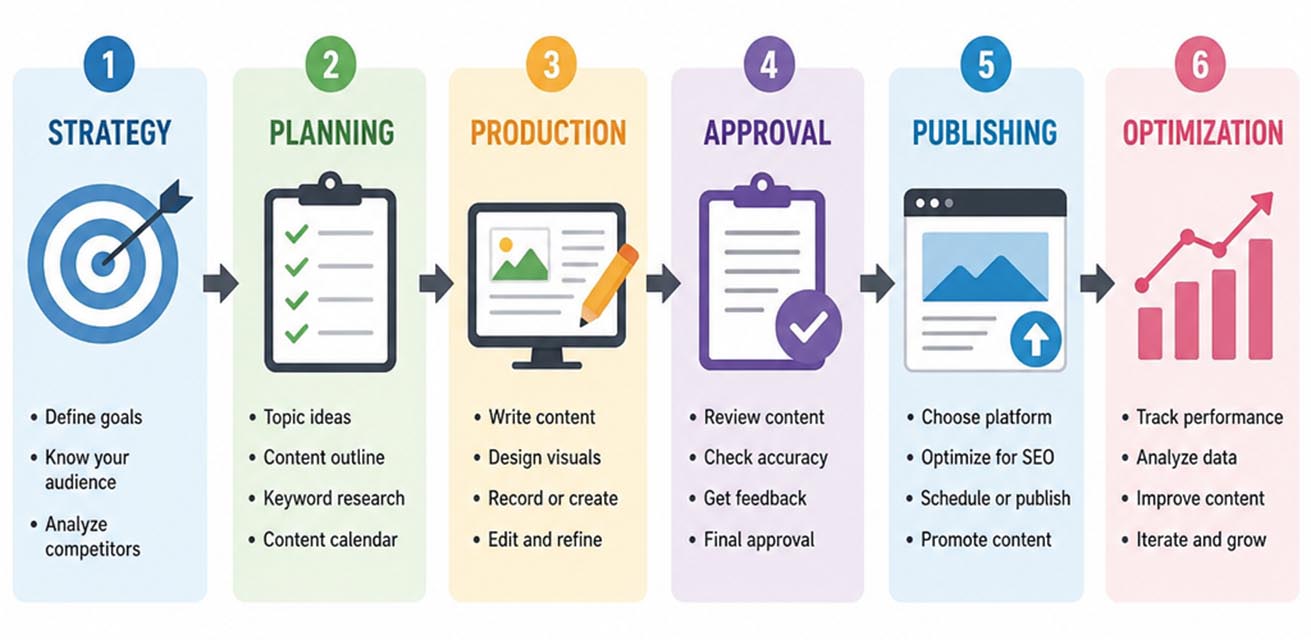
The core content tool stack
A practical content stack starts with the journey your work already takes. If your team spends most of its time chasing approvals, a better CMS alone will not solve the problem. If your main bottleneck is inconsistent product information across channels, a social scheduler will not help. The key is to map the content workflow before buying more software.
For most teams, the stack falls into a few useful layers:
- Strategy and planning: Tools that help translate goals into topics, campaigns, calendars, and briefs.
- Project and workflow management: Tools that assign work, track statuses, and reduce “where is this?” messages.
- Content creation: Writing, design, AI-assisted drafting, templates, editing, and collaboration tools.
- Content management: CMS platforms, headless CMS tools, DAM systems, PIM tools, and video libraries.
- Content distribution: Social media management, email, publishing calendars, and syndication tools.
- Content optimization: SEO guidance, analytics, content audits, and performance insights.
- Governance: Permissions, brand controls, approval paths, version history, and documentation.
This layered view keeps decisions grounded. Instead of asking, “What is the best tool?” ask, “Which part of our process is slow, risky, invisible, or inconsistent?” That question usually reveals whether you need stronger content planning, better production controls, cleaner asset storage, or more reliable distribution.
Content planning tools that turn strategy into a calendar
Content planning tools help teams connect ideas to business goals, audiences, campaigns, deadlines, and channels. They are especially useful when content strategy involves multiple formats, such as blogs, landing pages, newsletters, videos, and social posts. The goal is not only to see dates on a calendar, but to understand why each asset exists and what must happen before it goes live.
Asana is a strong fit for teams that want a structured content calendar tied to tasks, dependencies, deadlines, and project visibility. Its content calendar resources position Asana as a central place to plan calendars and track content production, while its help documentation describes grouping content-calendar projects and monitoring project health. That makes it useful when editorial work intersects with campaign launches, design requests, legal review, or cross-functional approvals. (asana.com)
Airtable works well when content planning depends on flexible fields, views, and databases. Its content calendar template is designed to help teams plan, produce, and optimize content in a shared system, with calendar views for schedule visibility. This can be helpful for teams that need to track details such as target keyword, funnel stage, content owner, product line, campaign, channel, status, and performance notes. (airtable.com)
Notion is useful for teams that want planning, notes, briefs, and documentation in one workspace. Notion’s content calendar materials focus on streamlining the content creation process, while its template ecosystem supports databases that can be viewed as boards, timelines, or calendars. It is often a good choice for smaller teams that value flexibility over rigid project-management structure. (notion.com)
CoSchedule is built around marketing calendars and social publishing. Its site describes calendars that include social publishing for major networks plus content marketing integrations, making it relevant for teams that want campaign planning and promotion in the same environment. (coschedule.com)
What to include in a useful content calendar
A good calendar should do more than list publish dates. Include fields that make work easier to prioritize, produce, and evaluate:
- Primary audience or buyer segment.
- Content format, such as blog, guide, video, email, landing page, or social post.
- Target topic, keyword, or campaign theme.
- Funnel stage or user intent.
- Owner, reviewer, designer, and approver.
- Current workflow status.
- Draft, review, approval, publish, and refresh dates.
- Distribution channels.
- Asset links, brief links, and final URLs.
- Performance notes for future content optimization.
Content workflow tools for cleaner production
Content workflow tools make the production process visible. They help teams answer practical questions: Who is writing the draft? Has design started? Is the subject matter expert review complete? Are final images approved? Has the page been scheduled in the CMS?
A workflow can be managed in a dedicated project tool such as Asana, a flexible database such as Airtable, a documentation-first workspace such as Notion, or a visual board such as Trello. Trello’s calendar and planner features support date-based work views, which can help lightweight teams manage content tasks without overcomplicating the process. (support.atlassian.com)
A strong content workflow usually has fewer statuses than teams expect. Too many statuses create maintenance work; too few create confusion. Start with a simple sequence, then add nuance only where it improves accountability.
A practical workflow might look like this:
- Idea captured: The concept is logged with audience, goal, and potential channel.
- Brief approved: The team agrees on angle, keyword, message, structure, and deliverables.
- In production: Drafting, design, recording, or build work is underway.
- Internal review: Editors, marketers, product experts, or stakeholders give feedback.
- Final approval: The responsible approver signs off on copy, visuals, claims, and links.
- Scheduled: The asset is loaded into the CMS, email platform, social tool, or video platform.
- Published: The content is live and distribution begins.
- Measured or refreshed: Performance is reviewed and the asset is updated when needed.
The best workflow is one your team will actually use. If contributors avoid the system, simplify the fields, clarify ownership, and remove duplicate tracking spreadsheets.
CMS and web content platforms for publishing at scale
A content management system is the foundation for website publishing. It gives teams a place to create, edit, organize, and update website content without rebuilding pages manually every time. The right CMS depends on your technical resources, content model, governance needs, and how many channels your content supports.
WordPress remains a flexible option for blogs, resource centers, marketing sites, and small-to-mid-sized content operations. WordPress.org describes built-in content management, user management, and an extensive plugin directory, which makes it adaptable for many editorial and SEO workflows. (wordpress.org)
HubSpot Content Hub is useful when content management needs to connect closely with marketing, CRM, landing pages, and lead generation. HubSpot describes its content products as including CMS tools for creating and managing website content, with free and premium options depending on the scale of the operation. (hubspot.com)
Contentful is better suited for teams that need modular, API-first content across many digital experiences. Contentful describes its platform as composable, with content broken into modular components that can be reused across channels. This approach is especially relevant for organizations managing web, app, commerce, localization, and personalization needs from shared content models. (contentful.com)
CMS selection criteria
When comparing content tools for web publishing, evaluate:
- How easy it is for nontechnical users to draft and update pages.
- Whether the CMS supports reusable content blocks and templates.
- How permissions and approval roles are handled.
- Whether SEO fields, redirects, metadata, schema, and internal links are easy to manage.
- How well the platform integrates with analytics, CRM, DAM, PIM, ecommerce, or personalization tools.
- Whether the system supports localization, accessibility standards, and future channel expansion.
A CMS should not trap content in a format your team cannot reuse. If your content strategy depends on publishing the same information across websites, apps, marketplaces, and campaigns, prioritize structured content and integration flexibility.
Content creation tools for faster, more consistent production
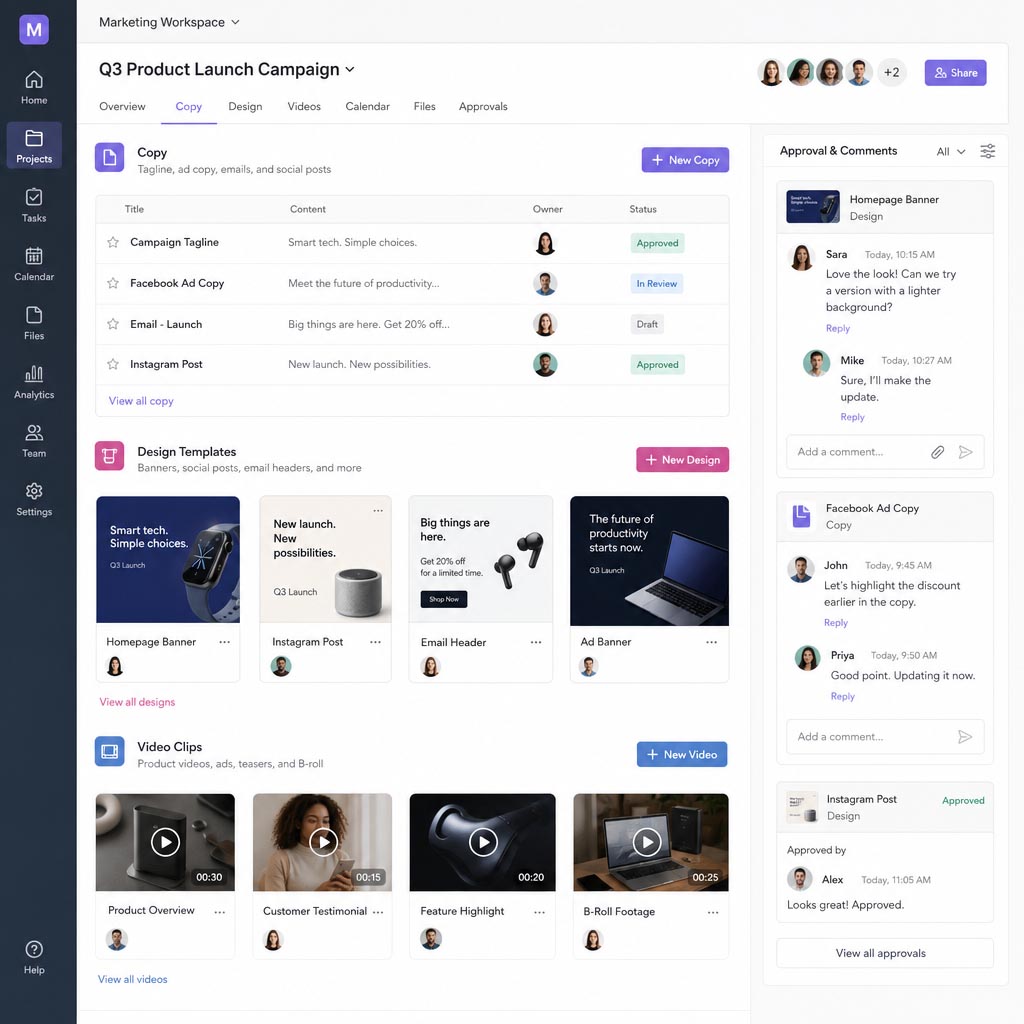
Content creation tools help teams produce copy, graphics, videos, short-form posts, campaign assets, and branded templates. They are most valuable when they reduce repetitive work while protecting quality. Speed matters, but consistency matters just as much.
Canva is widely used for social media graphics, presentations, short videos, and simple branded assets. Canva’s social media pages emphasize templates, design tools, and planning features for creators and businesses, making it useful when marketers need to create channel-ready visuals quickly. (canva.com)
Adobe Express is another strong option for teams creating social posts, videos, flyers, and campaign visuals. Adobe describes Express as a quick content creation app for social posts, images, videos, flyers, and more, while its scheduler documentation covers planning, previewing, scheduling, and publishing social posts from the platform. (developer.adobe.com)
Figma is valuable when content creation overlaps with design systems, product marketing, and collaborative campaign production. Figma’s materials describe marketing-focused creation features, including tools for generating social posts, ad headlines, product descriptions, and other short-form marketing content on the canvas. (figma.com)
Grammarly Business can support editing, tone consistency, and clarity across business writing. Grammarly describes its business writing tools as helping teams improve clarity, rewrite text, and strengthen calls to action, which can be useful for teams producing many drafts across departments. (grammarly.com)
For teams that do not have in-house capacity, social media management and content creation services can complement software. In that case, your tools should still provide briefs, asset access, review comments, and approval history, so outside creators can plug into the same system rather than creating another disconnected process.
Content optimization tools for search and performance
Content optimization tools help improve how content is structured, discovered, read, and acted on. They should not replace editorial judgment, but they can reveal missed search intent, weak headings, thin sections, readability issues, or technical SEO gaps.
Semrush offers content tools for keyword-informed planning, briefs, content creation, and optimization for Google and AI search experiences. Its content solution materials describe long-form content based on keyword and prompt data, SEO brief generation, and optimization features. (semrush.com)
Surfer focuses on SEO content workflows, including content editor guidance, content scoring, and optimization recommendations. Its documentation describes writing SEO-optimized articles, using outlines that include relevant keywords, and evaluating optimization progress through a content score. (docs.surferseo.com)
Yoast SEO is especially relevant for WordPress users. Yoast describes its plugin as supporting content optimization, sitemaps, schema markup, and social previews inside WordPress, which makes it useful for teams that want SEO checks close to the publishing workflow. (yoast.com)
Optimization should happen at multiple moments:
- Before drafting: Confirm search intent, audience needs, angle, and differentiation.
- During drafting: Use headings, examples, internal links, and clear next steps.
- Before publishing: Check metadata, readability, accessibility, schema, links, and calls to action.
- After publishing: Review rankings, engagement, conversions, assisted revenue, or lead quality.
- During refresh cycles: Update outdated claims, improve weak sections, merge overlapping pages, and republish stronger assets.
The goal is not to satisfy a score for its own sake. The goal is to make content more useful, findable, trustworthy, and aligned with business outcomes.
Distribution and social media management tools
Content distribution turns finished assets into audience touchpoints. Without a distribution plan, even strong content can sit unnoticed. Social media, email, newsletters, partner channels, sales enablement, paid campaigns, communities, and internal communications all require planning.
Buffer is useful for straightforward social scheduling and publishing. Buffer describes support for scheduling content to major social platforms, including Facebook, Instagram, TikTok, LinkedIn, Threads, Bluesky, YouTube Shorts, Pinterest, Google Business, Mastodon, and X. (buffer.com)
Hootsuite combines social scheduling, content calendars, approvals, engagement, and analytics. Its platform materials describe creating, scheduling, publishing, engaging with, and analyzing social media content from a unified platform. (hootsuite.com)
Sprout Social is a strong fit for teams that need publishing, collaboration, queueing, approvals, and reporting in a more robust social media management environment. Sprout describes its Publishing Calendar as a place to plan, schedule, collaborate, and track posts across networks. (sproutsocial.com)
Mailchimp can support email and campaign distribution. Its Campaign Manager documentation describes planning, executing, and analyzing marketing efforts, including email and social campaign components. (mailchimp.com)
A distribution checklist should include:
- Primary channel and supporting channels.
- Channel-specific copy, creative, and links.
- Posting dates and time windows.
- UTM or campaign tracking requirements.
- Audience segment or list.
- Repurposing plan for short-form posts, email snippets, sales enablement, or video clips.
- Owner for engagement, comments, and follow-up.
- Measurement window and performance review date.
Content distribution works best when planned before content is finished. If promotion is an afterthought, teams often miss easy opportunities to repurpose the core idea.
Product content management and ecommerce tools
Product content management becomes essential when a business manages many SKUs, attributes, product descriptions, technical specifications, images, variants, translations, or marketplace requirements. In this environment, spreadsheets often become risky because product data changes quickly and must stay consistent across channels.
Product information management, or PIM, centralizes product data so teams can enrich, govern, and distribute it across ecommerce, marketplaces, catalogs, and retail partners. Plytix defines PIM as centralizing, organizing, and distributing product information, while Akeneo describes PIM as a way to centralize, enrich, translate, and prepare product marketing data for exports to multiple channels. (plytix.com)
Akeneo is a common option for structured product data and enrichment workflows. Its PIM materials emphasize centralizing, structuring, enriching, and governing product information. (akeneo.com)
Salsify focuses on product experience management across the digital shelf. Salsify describes its platform as supporting product information management, syndication, digital shelf analytics, and product content optimization across selling destinations. (salsify.com)
Plytix positions its platform around PIM, DAM, feed management, AI content, and Shopify synchronization in one connected system. That combination can be useful for ecommerce teams that want product data, assets, channel feeds, and copy workflows closer together. (plytix.com)
If product pages are part of your content strategy, do not treat product content as a separate universe. Product descriptions, comparison copy, category pages, buying guides, images, and videos all influence discovery and conversion.
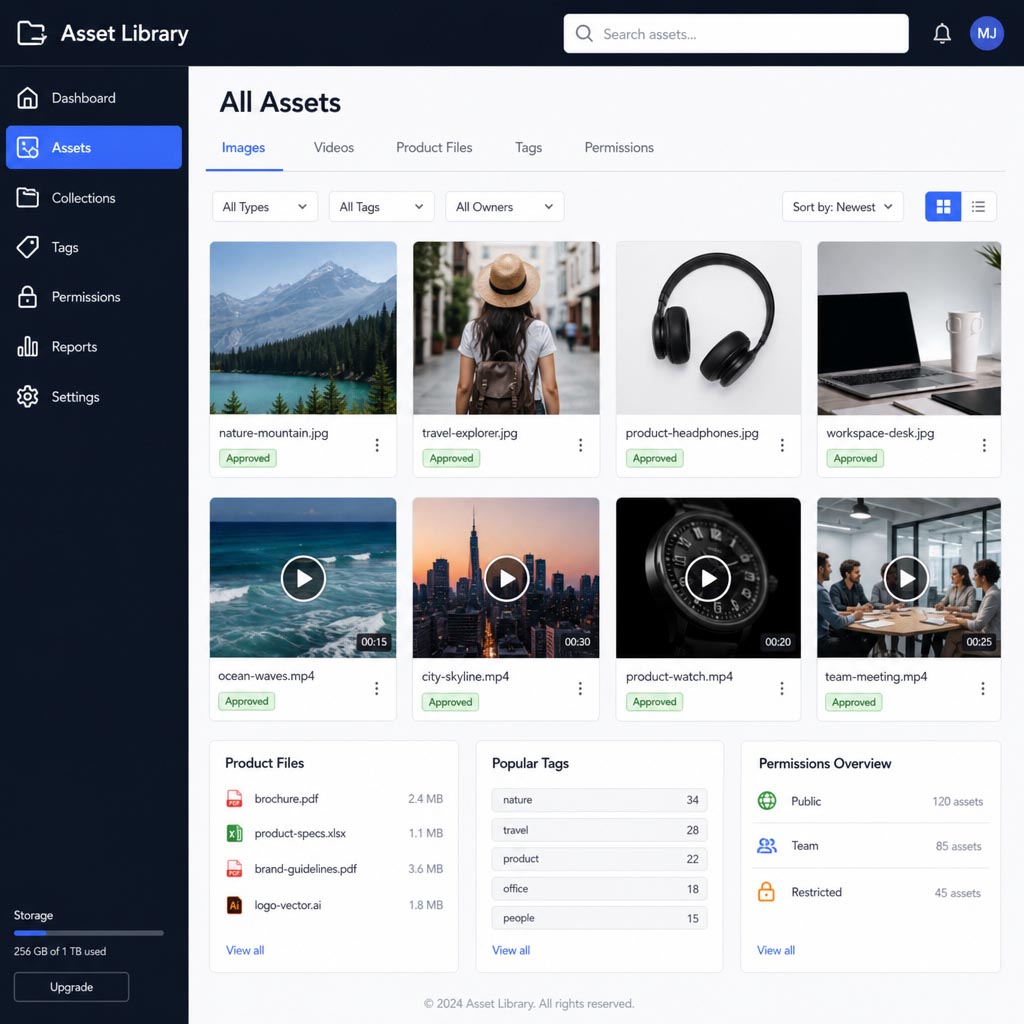
Video content management and digital asset management
Video content management matters when teams produce webinars, demos, training videos, customer stories, social clips, product explainers, or internal communications at scale. The challenge is not only hosting files. Teams also need permissions, versions, captions, thumbnails, transcripts, analytics, and secure sharing.
Vimeo Enterprise is designed for organizations that need secure video libraries, team management, analytics, and advanced user or content controls. Vimeo’s enterprise materials describe searchable secure video libraries, team management, analytics, and permissions for business video use. (help.vimeo.com)
YouTube Studio is useful for creators and brands publishing to YouTube. Google’s YouTube Help resources describe managing videos from the Content page and using YouTube Analytics to understand channel and individual video performance. (support.google.com)
Cloudinary supports image, video, and digital asset management workflows. Its documentation describes Cloudinary Assets as a DAM product that helps creative and marketing teams collaborate across the digital asset management workflow, while its video DAM materials focus on managing the video lifecycle. (cloudinary.com)
Bynder is another DAM option for organizations that need a system of record for approved brand assets. Bynder describes its DAM as a place where content is brand-approved, findable, and ready for activation at scale. (dev.bynder.com)
A DAM or video platform becomes more important when teams repeatedly ask:
- Which file is the final version?
- Is this image approved for this campaign or region?
- Where is the latest product video?
- Can sales, partners, or agencies access the correct assets?
- Are captions, transcripts, thumbnails, and usage rights documented?
How do you choose the right content tools for your team?
Choose content tools by starting with your workflow problems, not by chasing the longest feature list. The right platform should remove friction from the way your team plans, creates, approves, distributes, and improves content; if it adds complexity without changing outcomes, it is not the right fit.
Use these criteria to narrow your options:
- Content volume: A small team publishing weekly may need a simple calendar and CMS. A larger team managing hundreds of assets may need workflow automation, DAM, and governance.
- Channel complexity: More channels mean stronger metadata, distribution planning, and asset controls.
- Approval requirements: Regulated, technical, legal, or enterprise content needs clear review paths and version history.
- Team structure: In-house teams, agencies, freelancers, product marketers, and sales teams all need different access levels.
- Integration needs: Tools should connect with your CMS, analytics, CRM, ecommerce platform, social channels, DAM, or PIM.
- Ease of adoption: A powerful tool that nobody updates will fail. Choose software that matches how your team actually works.
- Governance: Look for permissions, naming conventions, templates, audit trails, and brand controls when consistency matters.
- Reporting: Make sure the system can support the metrics your team uses to improve content, not just publish it.
Before committing, run a pilot with real content. Build one campaign, one blog workflow, one product update, or one video series inside the tool. A real pilot reveals gaps that sales demos often miss.
A practical rollout plan
Rolling out a streamlined content management system is easier when you treat it as an operational change, not a software switch. Start small, document the process, and improve it as the team learns.
- Audit your current process. List every place content is planned, drafted, reviewed, stored, published, and measured. Identify duplicate tools, unclear handoffs, and recurring delays.
- Define your minimum workflow. Choose the few statuses, fields, and approval steps every asset must follow.
- Select tools by layer. Decide what will handle planning, workflow, CMS publishing, creation, distribution, optimization, and asset storage.
- Create templates. Build reusable briefs, task lists, design templates, metadata checklists, and publishing checklists.
- Set naming conventions. Use consistent names for campaigns, assets, files, products, regions, dates, and versions.
- Assign ownership. Every tool needs an owner who maintains fields, permissions, templates, and documentation.
- Train contributors. Show writers, designers, reviewers, and stakeholders exactly what they need to do, not every feature in the platform.
- Review after one publishing cycle. Ask what slowed the team down, what was unclear, and what can be simplified.
The goal is a content workflow that becomes easier over time. Each publishing cycle should leave behind cleaner templates, better briefs, stronger assets, and clearer performance data.
Common mistakes to avoid
Even good content tools can fail if the process around them is weak. Watch for these common mistakes:
- Buying tools before mapping the workflow: Software cannot fix a process nobody understands.
- Tracking the same work in multiple places: Duplicate calendars and spreadsheets create conflicting sources of truth.
- Overbuilding statuses and fields: Complexity makes teams avoid updates.
- Ignoring governance: Without permissions, version control, and approval rules, mistakes become more likely as volume grows.
- Separating creation from distribution: Promotion should be planned while the content is being developed.
- Treating optimization as a final polish: SEO, audience intent, and conversion goals should shape the brief from the start.
- Forgetting product and video assets: Product data, images, and videos need the same discipline as articles and campaigns.
- Skipping performance reviews: If no one reviews results, the next content plan starts from guesswork.
A streamlined content operation is built through consistent habits. Tools make those habits easier to maintain, but they cannot replace clear strategy, ownership, and review.
Final takeaways
The top tools for streamlined content management are the ones that help your team move from scattered effort to a connected system. Asana, Airtable, Notion, Trello, and CoSchedule can support planning and workflow. WordPress, HubSpot, and Contentful can anchor web content management. Canva, Adobe Express, Figma, and Grammarly can speed up content creation. Semrush, Surfer, and Yoast can support content optimization. Buffer, Hootsuite, Sprout Social, and Mailchimp can improve content distribution, while Akeneo, Salsify, Plytix, Cloudinary, Bynder, Vimeo, and YouTube Studio can support specialized product, asset, and video content management.
Start with the bottleneck that costs your team the most time or creates the most risk. Then choose tools that make that part of the content workflow clearer, faster, and easier to repeat. A well-built content system does more than publish more content; it helps every asset serve a defined purpose, reach the right audience, and improve with each cycle.
Related Posts